

Workforce operations for Canadian and US teams
GENIALCLOUD TEM + TIME
Give Finance, HR and Operations one view of travel spend, working hours and attendance across offices, plants and job sites.
Manage expenses, time and attendance in one place.
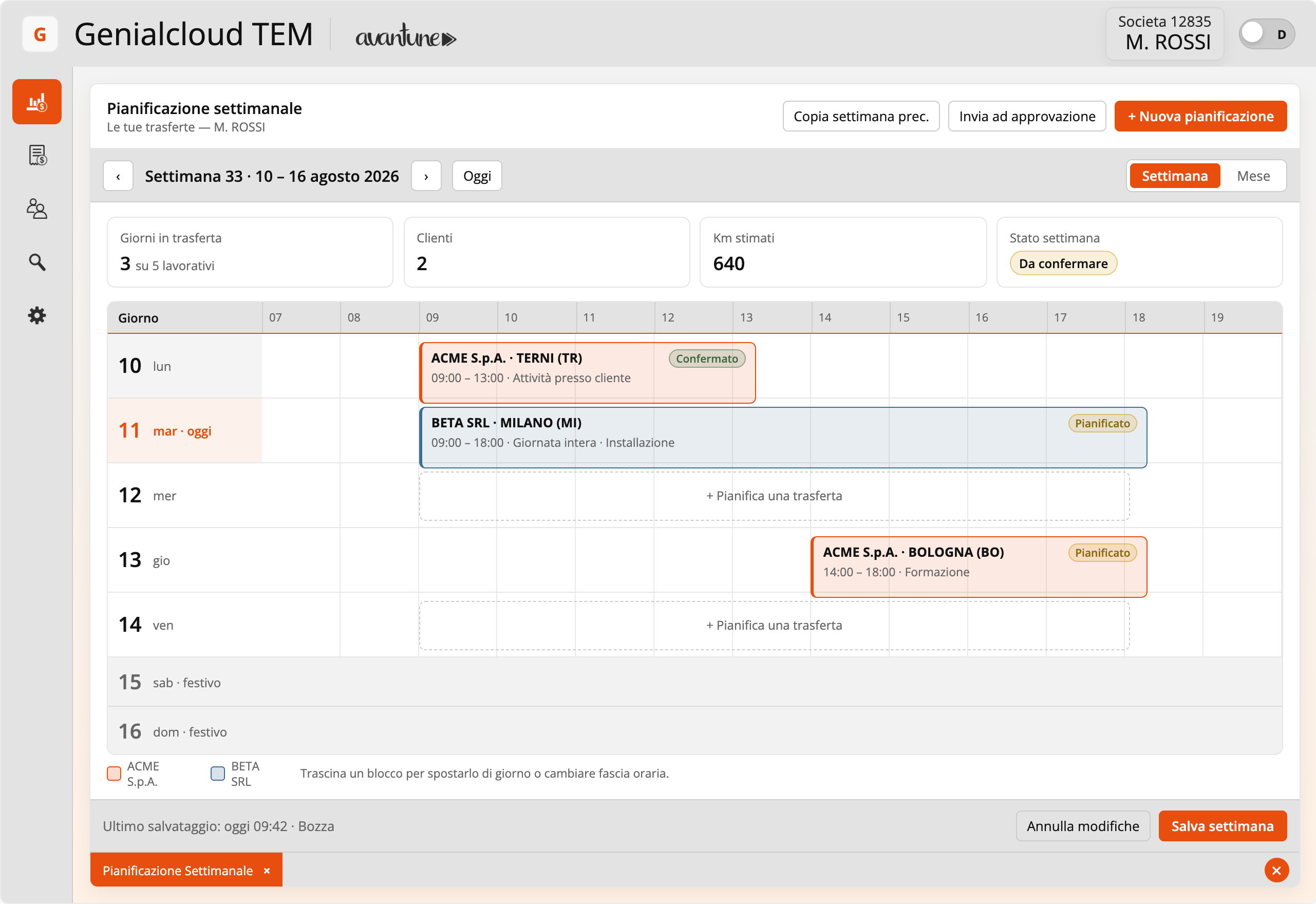
Weekly schedule, trip entry and day-by-day activity.
The cost of disconnected workflows
See what labour and travel cost before month-end.
A crew logs hours at a job site, a technician pays for a hotel and Finance asks for receipts. When the records live in separate systems, job costs and payroll inputs take longer to reconcile.
Genialcloud TEM covers trip requests, approvals, expenses and reimbursement workflows. Genialcloud Time records hours, attendance and leave. Together, they give Canadian and US teams a shared record for Finance, Operations and payroll preparation.
Receipts scattered across inboxes
Finance spends time matching receipts to claims, and employees wait for updates on reimbursement.
Job costs arrive late
Without a shared record, teams may only see the combined cost of labour and travel after month-end.
Exceptions pile up at close
A hotel rate over policy takes longer to resolve once the trip is over.
Travel, expenses and time
One workspace for workforce records.
Plan a trip, submit a claim, record a shift or request time off. Link approved expenses and recorded hours to the work they support.
TRAVEL AND EXPENSE CONTROLS
Trip requests through reimbursement
- Employee and contractor workflows
- Browser and mobile access
- Expense reporting by category
- Configurable approval paths
- Central records for Finance
- Policy exceptions surfaced early
Travel requests and reimbursements
Have employees request travel before booking, capture expenses during the trip and send claims to the appropriate approver. Finance can follow the claim through reimbursement.
Expense policy at entry
Apply company rules such as receipt requirements, mileage rates and lodging limits when an expense is entered. Finance can follow spending as it comes in.
Time, attendance and time off
Collect shift hours, overtime, vacation and leave in one workflow. Supervisors can review exceptions against the rules configured for their teams.
Activities across job sites
Let staff record work from the shop floor, a customer site or the road. Mobile activity entered offline can sync when connectivity returns.
Capture receipts from a phone
Photograph a receipt when you get it. Keep the supporting document with the claim so Finance can review the expense in context.
Connect hours and expenses to jobs
Use the same project record for labour and travel costs, so project managers and billing teams work from consistent data.
Expense workflow
Check the claim when the expense is entered and route exceptions for review.
Configure the workflow around your travel and expense policy. A claim can be checked for a missing receipt, the right expense category or spending over the applicable limit.
Send exceptions to the responsible approver and give the employee a clear next step.
TRAVEL PORTAL
Trip requests and pre-approval
- Role-based approval paths
- Access through a browser
- Current spending by trip
- Notifications when review is needed
- Supporting records in one place
- Claim status through reimbursement
Record the cost
Enter the trip or expense from your phone or computer.
Apply the policy
Check the amount and supporting information against the rules for the claim.
Identify exceptions
Flag issues such as a missing receipt or a charge over the limit.
Send it for review
Route the exception to the person responsible for the decision.
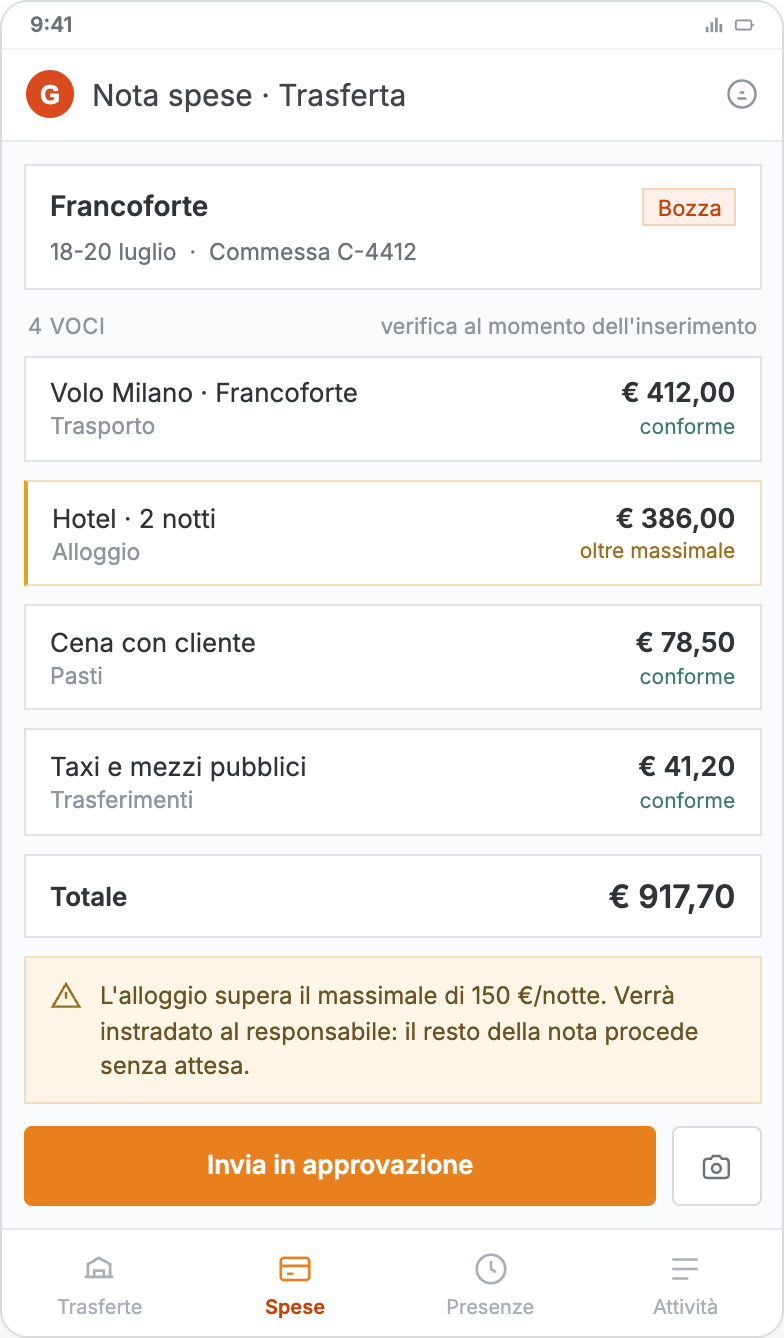
Resolve exceptions while the details are fresh.
A technician enters a trip from a phone. Three items are within policy and the hotel rate is over the configured cap.
The employee sees why the hotel charge needs review, and the approver receives the details needed to decide.
For planned trips, teams can apply policy before booking, while there is still time to adjust the itinerary.
Multi-site teams
One attendance record for every work location.
A Canadian manufacturer may have people at a plant, at a warehouse and at customer sites on the same day. Time gives each team a way to record its activity from where the work happens.
Supervisors can review attendance, leave and working hours together, with fewer spreadsheets to reconcile between sites.
MOBILE WORKFLOWS
Enter travel expenses on site
- Attach receipt photos to a claim
- Record attendance in the field
- Work offline when needed
- Review employee and team records
- Sync data with the browser workspace
- Access through a secure login
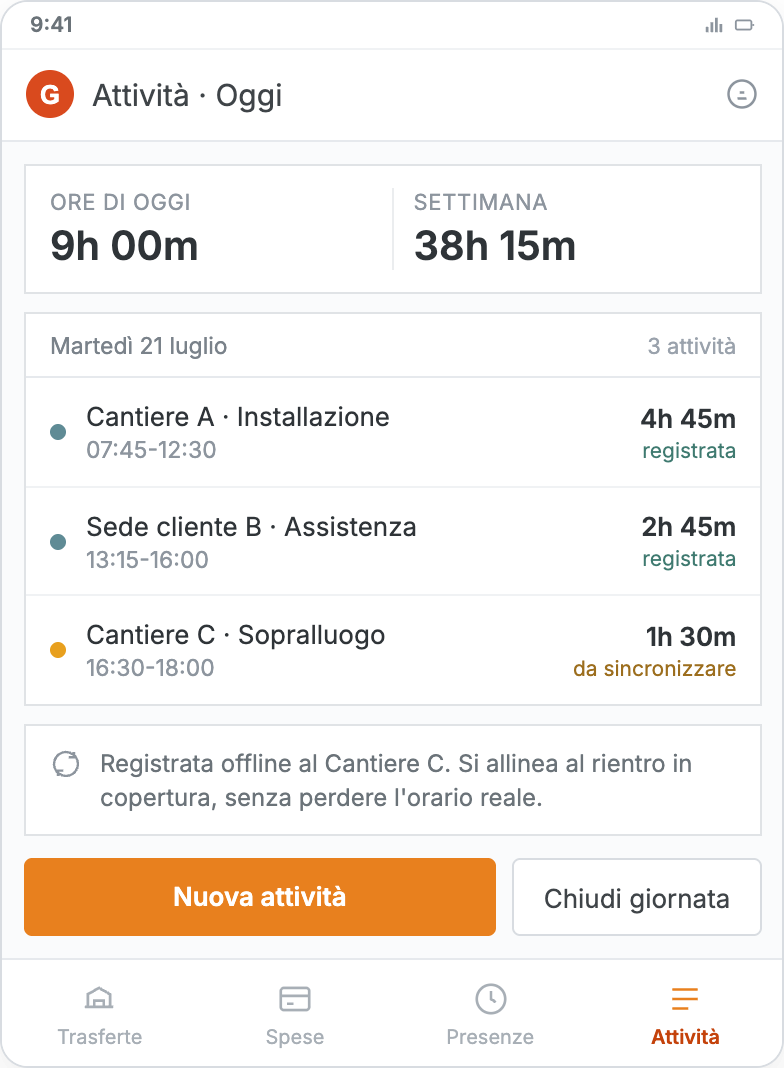
Record activity offline at a job site and sync it when coverage returns.
Time and attendance
Schedule shifts, review hours and manage time off.
HR, Finance and Operations can work from the same attendance records. Employees can clock in through the browser, the mobile app or supported time clocks.
TIME AND ATTENDANCE
Employee hours by team and location
- Browser and mobile clock-in and clock-out
- Vacation and leave approvals
- Configurable shift and overtime rules
- Records for review and audit
- Daily and monthly attendance views
- Dashboards and exports for HR
Shift schedules
Set expected hours by person or team and compare them with actual attendance.
Vacation and leave
Submit and approve time-off requests alongside attendance records.
Regular hours and overtime
Review actual hours and overtime before preparing the next payroll export.
Clock-in options
Use supported time clocks, a web browser or the mobile app to collect attendance.
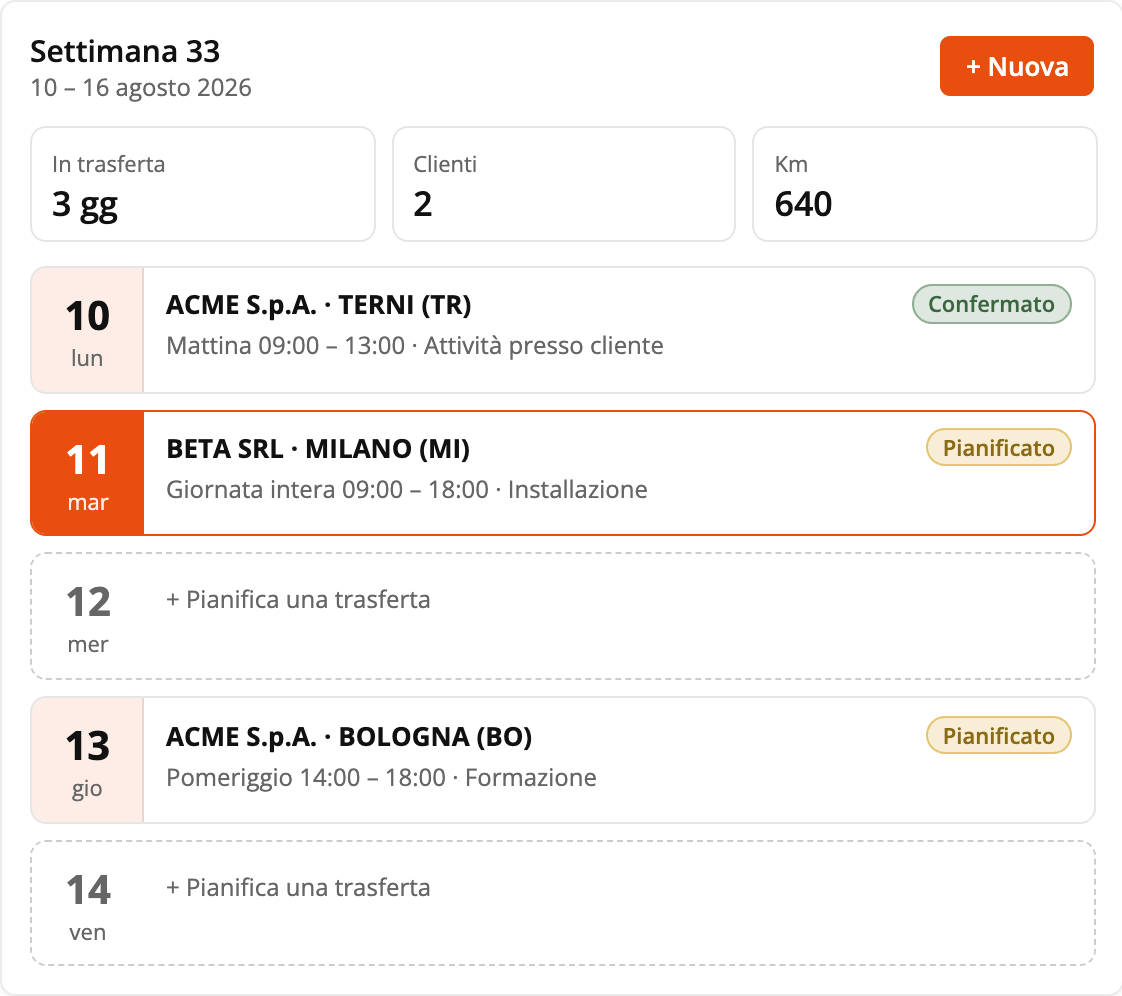
Supervisors can see the same week in the browser that employees recorded in the field.
Job costing and customer billing
Connect billable hours and expenses to the right job.
Assign labour and travel costs to a job as they are recorded. Project managers can review the cost of serving a customer, while billing can use the same records and Finance can trace approvals.
Payroll preparation
Genialcloud Time prepares processed attendance records for your payroll provider.
Standard ADP file formats are supported. Confirm the required layout, fields and transfer method for your payroll setup during implementation.
L.I.O.N. · Navigate
Give approvers the context to focus on the exceptions.
Genialcloud Trinity AI supports this workflow by bringing unusual entries and policy exceptions to the attention of the people who review them.
Flag unusual expenses
Bring an unusual claim or policy exception to the approver with its supporting details.
Ask about workforce costs
Use natural-language questions to explore team or job costs over a given period.
Surface policy exceptions
Check travel requests and claims against company rules before the approval decision.
A field service example
A service call from trip request to job cost.
Consider a fictional field service team whose technician travels from Toronto to a customer site in Ontario.
Illustrative example
Record the trip
The technician logs mileage, lodging and meals from a phone and attaches receipts where required.
Check each claim
The configured policy checks the entries as the technician records them.
Review the hotel rate
The lodging cost is over the cap. The supervisor gets the flagged item and its supporting receipt.
Post the costs to the job
The approved costs are available to project and reimbursement workflows, so the service manager can review the cost of the call.
Implementation scope
What your team controls.
Genialcloud Time prepares attendance data for downstream payroll processing. Standard ADP file formats are supported. Other file layouts can be scoped during implementation; payroll calculation stays with your provider.
Use geolocation rules to validate a clock-in at the expected worksite. Validation applies to attendance events rather than continuous location tracking.
Recorded hours can feed job costs directly. Your team still controls invoice release, including approval before sending the invoice to the customer.
Used by companies such as




Request a demo
See your workflows in a demo
Bring a travel policy, an attendance exception or a sample payroll file layout. We can walk through how your teams would capture, review and hand off those records.
Read about travel and expense controls, time and attendance, and payroll exports in the Genialcloud TEM + Time white paper.
Explore the connected platform